Quickly create a new series from scratch or a template
A series is a newsletter or communication you send on a regular basis. Create one using a pre-built template or start from scratch. Owners, Admins, and Members with the appropriate permissions can create new series.
Table of Contents:
- Create using series templates
- Create from scratch
- Collaborate on an existing series
- View all series
- Recover recently deleted series
- FAQs
1. Create using series templates
🛠️ How it works:
- Navigate to the "New series" button on the left panel under the Series section.
-
Select a template to start from:
- All staff
- HR updates
- Sales updates
- Industry news and updates
- Click on the subject line to open the pre-populated draft and start writing.
💡 Learn how to customize your series here.
2. Create from scratch
🛠️ How it works:
- Navigate to the "New series" button on the left panel under the Series section.
- Select "Create custom series" to start from scratch.
- Follow the prompts to create your new series.
- Use our Smart Outlines feature to set up your first edition by generating card topics and axioms based on your communication type.
- Start writing!
💡 If you are starting from scratch, here is some helpful information to guide you through setting up your new series.
3. Collaborate on an existing series
🛠️ How it works:
- A current member will add you as a collaborator on an existing series.
- You will receive an email from noreply@axioshq.com prompting you to log in.
- Once in the series, you will see the series name and any current drafts.
- To start editing, choose an existing edition or click "New edition" or "Create edition" to write a new one.
4. View all series
Upon login you will land on the All series page. These are the series you have created or collaborated on. Owners and Admins can see all series in their organization. Members can only see series they created or are a collaborator on.
🛠️ How it works:
- Navigate to the "View all" button located next to the Series section title on the left side panel.
- Browse your series or use the search bar for quick navigation.
- This page also displays average open rates and click rates so you can compare series performance.
5. Recover recently deleted series
Recently deleted series can be restored by an Owner, Admin, or series Sender within 30 days of deletion.
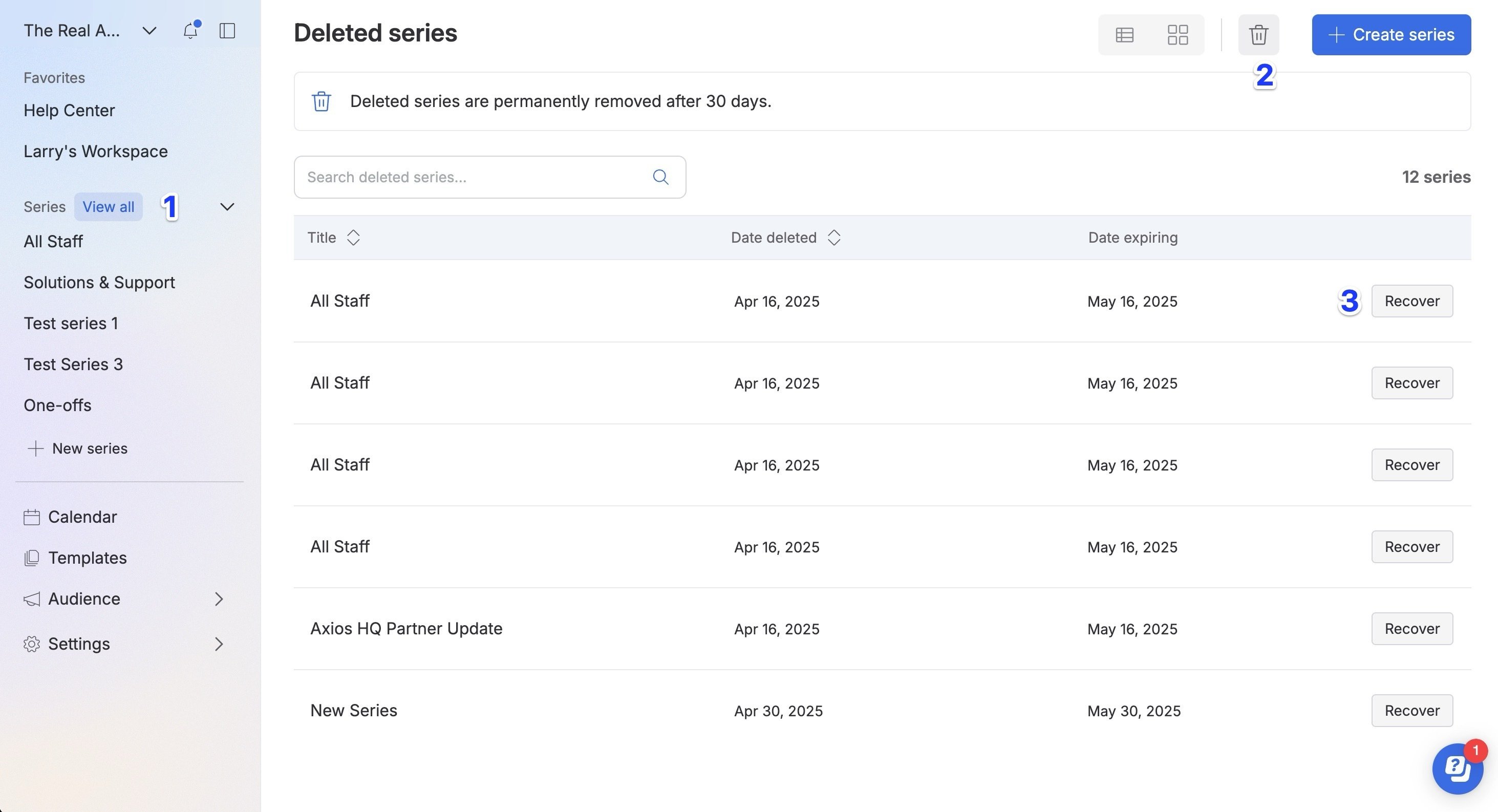
🛠️ How it works:
- Navigate to the All series page by selecting the "View all" button on the panel.
- Select the "Trash can" icon in the top right to view all deleted series.
- Click "Recover" next to the series to restore it.
6. FAQs
I can't create a new series — it's grayed out. Why?
You do not have permission to create a new series. Reach out to an Admin or Owner to change your permissions.
Are there other templates besides All staff, HR updates, Sales updates, or Industry news and updates?
Not right now, but we are hoping to add more in the future. If there is something in particular you would like to see, submit your feedback here.
How do I invite someone as a collaborator?
View instructions on how to add collaborators here.